Tom Kubinski Mary Albers www.sextonprinting.com
|
 |
November 2006 Issue TK'S Korner
Duotones, Tri-Tones, CMYK Quad-tones Michelle asks, "How do you set up Duotones?" Todd is wondering, "What are my options for proofing Duotones and why do they look different when on press?" Well, you are not alone and it has been difficult to understand these techniques little alone visualize their effects. It is important to realize, for example, that duotone effects can vary considerably, dependent upon the intensity of color showing through, thereby permitting a choice of effect without a change of ink. There is no doubt that the printed effect can be varied endlessly, either by manipulating the tonal scales of each halftone, or by utilizing different inks and paper. The combinations are many, and each changes the effect slightly. For example, the combination of certain inks will sometimes change a color. Yellow and black often become brown in appearance. Yet, no matter how important ink is, it is only as good as the paper it's printed on. Thus, there will be a difference when you print these effects on an uncoated versus coated sheet. Lets not forget the line screen as well. With all that said and done, I will attempt to take you down a proven path that has produced great results and given many an excellent idea of what they will get when on press.
Step Four: Select your Primary or Dominant color as well as your Highlight or Secondary color. -in this case, we are using Pantone PMS 300 and black
Step Six: Then drop each image into the curve that it belongs to. If you don't like the result for that particular image, it is ok to make adjustments for each image by changing the curve in the Highlights, Mid-tones or Shadow. Step Seven: Proofing. Before we discuss your options, it is important to state that you have been viewing these on a illuminated RGB monitor and now will be going to a CMYK printing format. There will be differences right off the bat. With that said, you have the following choices:
These steps may be taken for Tri-tones, Quad-tones as well. Yet, each subject, PMS color and stock will dictate what additional steps will be necessary. Also, it is important to mention that Metalic inks do gain/spread and will require you to pinch back the dots accordingly. Pantone has an excellent tool available (Doubt-Free Duotones) that actually has a wide selection of Bell curves all ready created for you to simply drop in images. It is a five-CD set providing access to 11,000 Adobe Photoshop duotone curves for over 900 Pantone Colors. You can call them at 888-726-8663 or visit their web site at www.pantone.com. While there, you may wish to view all the other tools they have available. Another fun and exciting tool, is from Sappi called Choices. I have scanned it in to give you an idea. Here they have taken one image and broken it down to sections that represents a CMYK quad-tone. Each section has then been detailed out for you on how it was created in the Highlights, Mid-tones and Shadow areas for each CMYK percentage. I do have this available to show you if you are interested. Just give me a call and we'll get together.
Referrals are greatly appreciated. If you know someone who I should contact, please let me know.
If you would like to join me on one of our upcoming tours, if there is something that you would like me to address, or if you know of someone who might like to receive TK's Korner, please let me know via e-mail at tkubinski@sextonprinting.com or phone. Successfully, |



 Step One: Scan your image(s) as four color images to capture all the values. If you only scan as a halftone, you'll loose many values that can take your image/design to the next level.
 Step Two: Convert your image(s) to grayscale.
 Step Three: Group all images into three different categories; Dark , Medium and light Images.
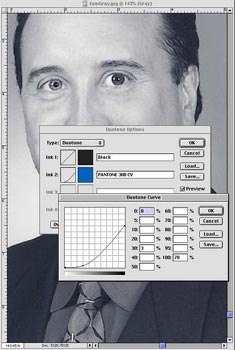 Step Five: Create your Bell Curves for the Primary & Secondary colors. Note, you will want to create a specific Bell curve for each one of the groupings or your Dark, Medium and Light images. It is best if you keep the curves as normal as possible. Meaning curves and not zig zags. That is the reason for creating curves for each one of the groupings. By having a master curve, you have created a look that now can be manipulated to fit the image better without recreating it from scratch for each image. In addition, you will have a better chance of keeping them similar throughout the piece.